
Flow Utility Toolkit Review
Mark Jones from the UK has built a genuinely useful Chrome extension for Salesforce Flow developers called the SF Flow Utility Toolkit.
The goal is ambitious. Think of it as a Salesforce Inspector-style utility, but purpose-built for Flow. After spending some time with it, it already feels like one of those tools that quickly becomes part of your daily admin toolkit.
Mark is also working on a Microsoft Edge version, which is currently awaiting approval.
You can install the Chrome version here:
SF Flow Utility Toolkit – Chrome Extension

Why This Extension Matters
Salesforce Flow has evolved rapidly over the last few years. While the platform itself continues improving, there are still many gaps around governance, documentation, discoverability, naming consistency, version management, and AI-assisted analysis.
This extension tackles a surprising number of those pain points.
The toolkit focuses heavily on three areas:
- Improving Flow maintainability
- Speeding up admin and developer tasks
- Making AI-assisted Flow analysis practical
The AI integration, in particular, is where this extension stands out.
Setup Menu Enhancements
Once installed, the extension adds several useful shortcuts directly into Salesforce Setup.
These include:
- Quick navigation back to the Flow list
- Direct access to Flow Trigger Explorer
- Shortcut to Process Automation Settings
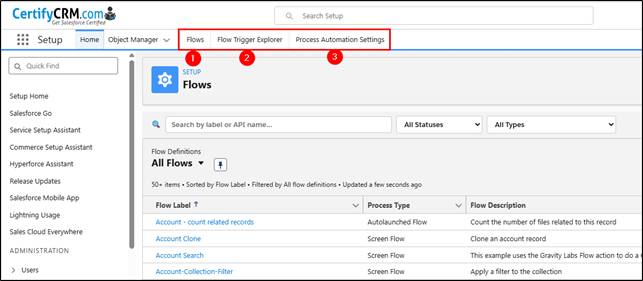
These sound small, but if you spend hours per week inside Flow Builder, reducing clicks matters.
Flow Health Check
One of the best features is the built-in Flow Health Check.
After opening a Flow, click the extension icon and run the Health Check analysis.
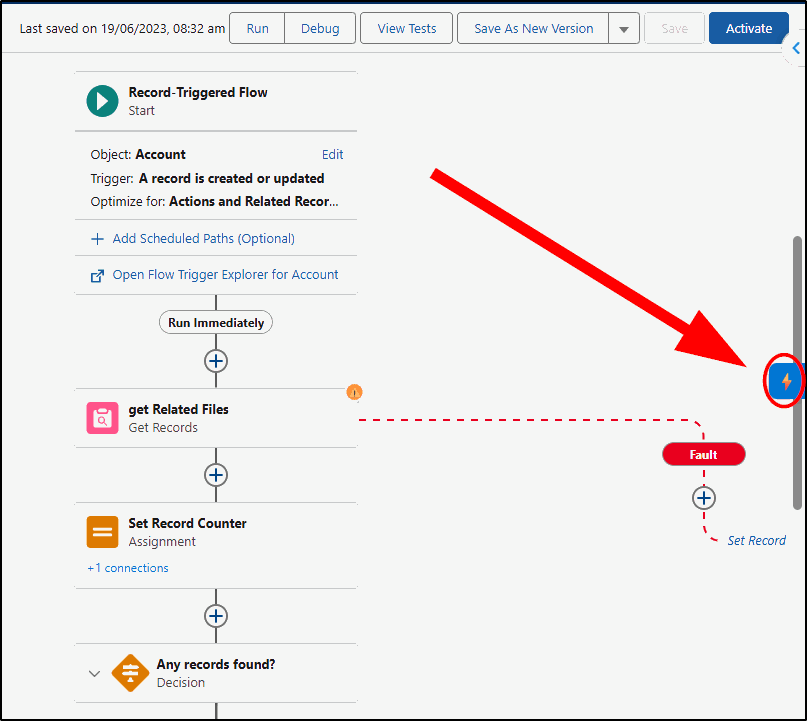
Choose Run Health Check from the Toolkit sidebar:
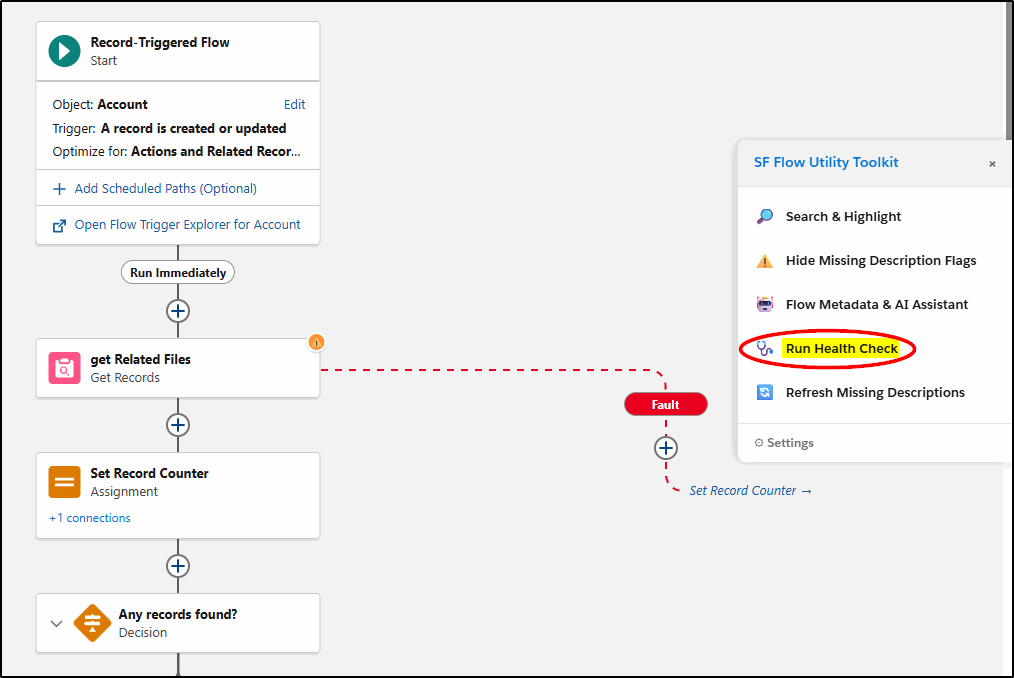
The toolkit reviews your Flow and produces a structured summary highlighting:
- Potential design issues
- Missing descriptions
- Complexity concerns
- Areas that may violate Flow best practices
The output can then be:
- Copied as plain text
- Exported as JSON
- Sent directly into an AI prompt
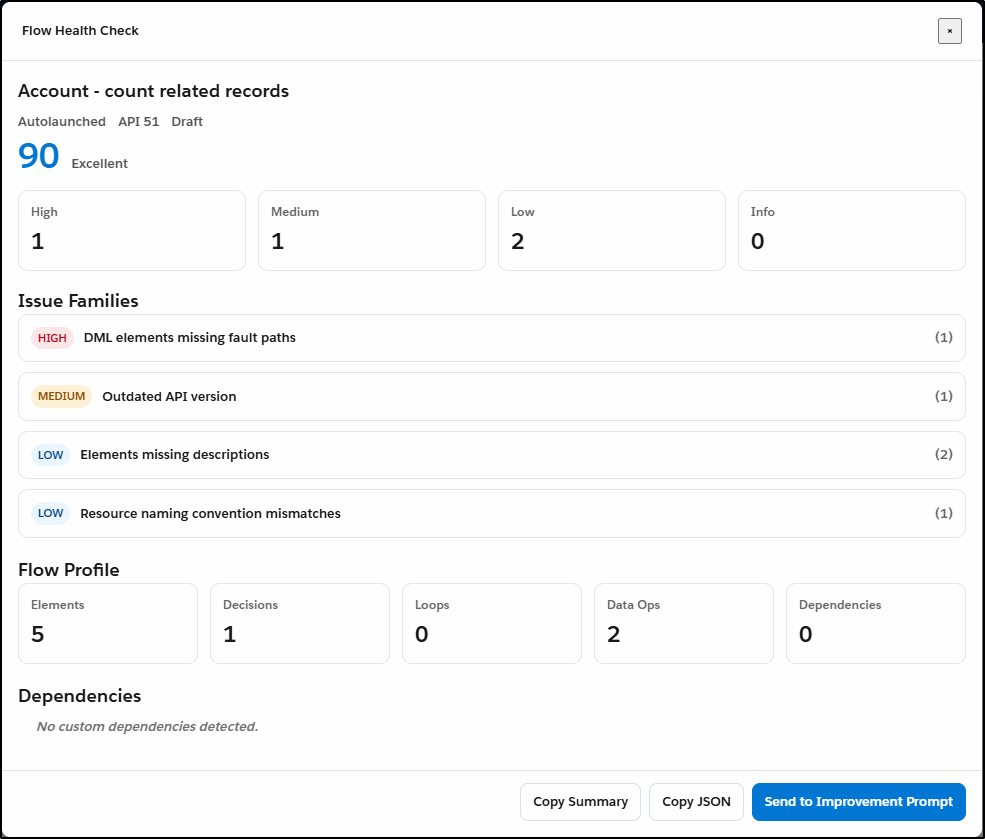
The Copy Summary button copies the text of this health check to the clipboard.
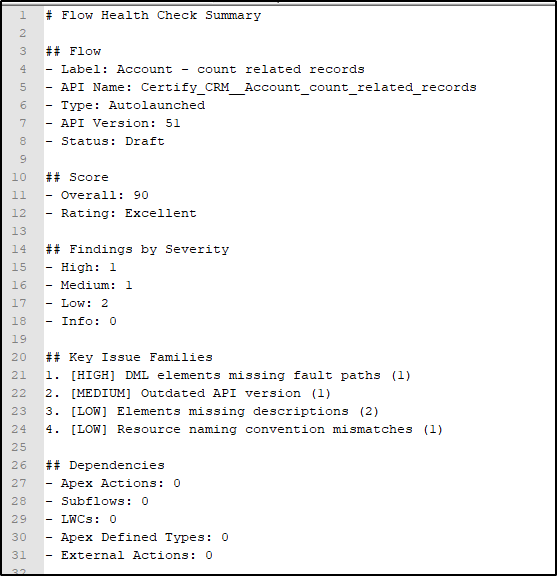
The Copy JSON copies the same summary just in JSON format.
The “Send to Improvement Prompt” option is especially useful.
Instead of manually explaining your Flow to ChatGPT or another LLM, the extension builds a structured prompt automatically and copies it to your clipboard.
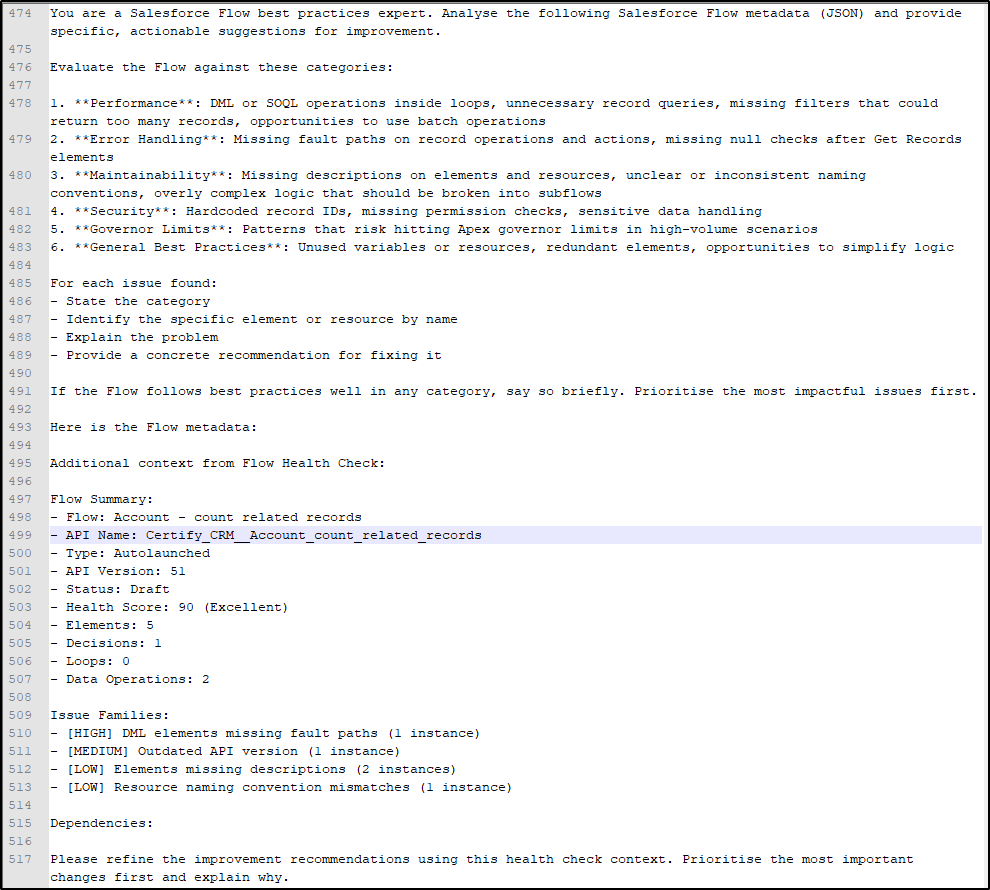
Paste it into tools like:
…and you immediately get a detailed Flow review with suggested improvements.
For Salesforce admins who are still learning Flow architecture or best practices, this is extremely valuable. It also dramatically reduces the effort required to perform peer reviews or technical reviews of Flows.
Missing Description Flags
This is one of those deceptively simple features that improves governance immediately.
The toolkit can display visual indicators on Flow elements that are missing descriptions.
For organisations trying to improve documentation standards, this is a quick win.
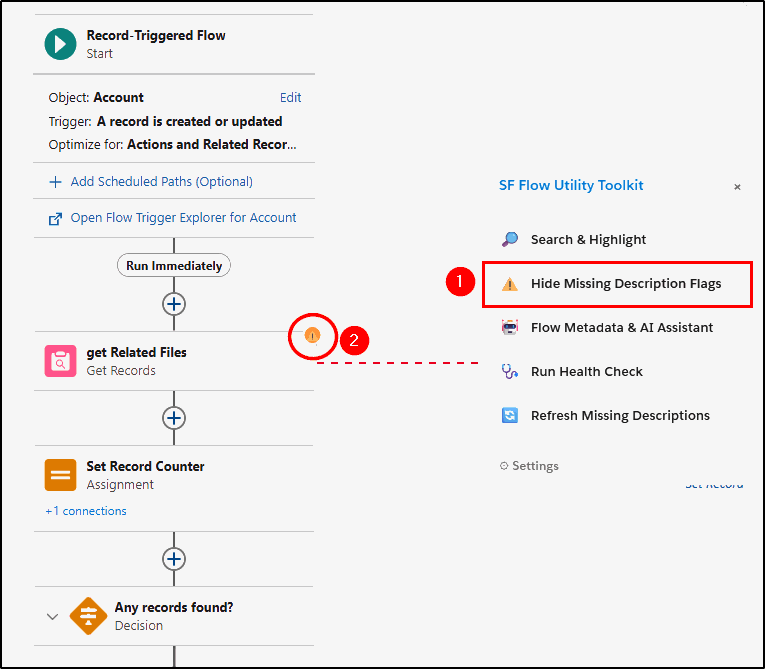
Good Flow documentation is one of the first things teams skip when deadlines are tight.
These reminder flags help reinforce good habits without adding friction.
API Name Generator
Naming consistency is a constant problem in Salesforce orgs.
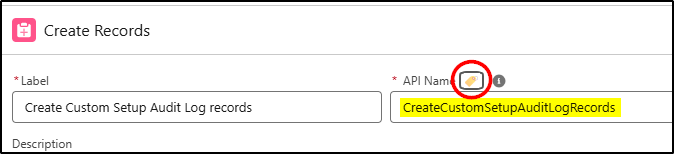
The toolkit includes an API Name generator that can automatically format names using:
- Snake_Case
- PascalCase
- camelCase
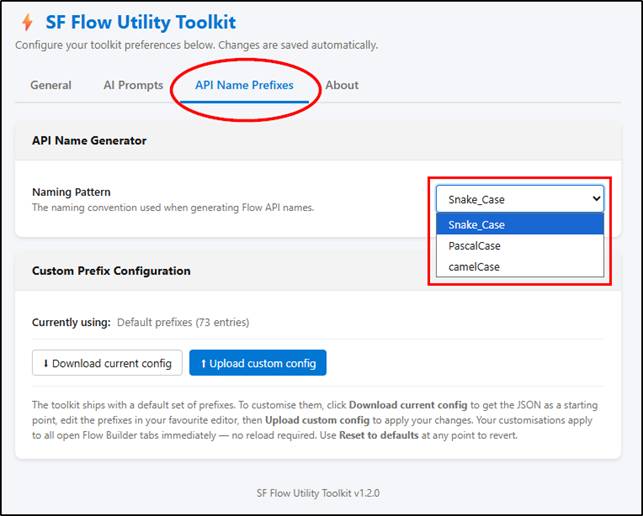
Click the icon in any API Name field to generate your new name:
You can also configure standard prefixes for Flow elements.
A predefined library of prefixes is already included, which saves a lot of setup time.
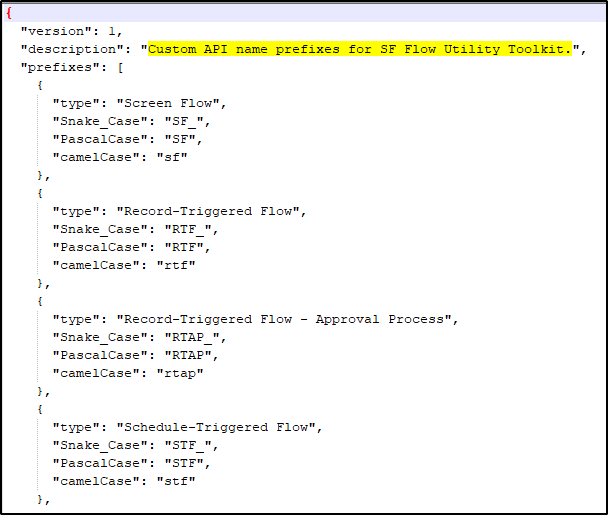
This is particularly useful for:
- Larger admin teams
- Consulting environments
- Managed service teams
- Organisations that are trying to standardise Flow naming conventions
Consistency improves maintainability. It also makes debugging far easier six months later when someone else inherits the Flow.
Flow Metadata & AI Assistant
This is probably the flagship feature.
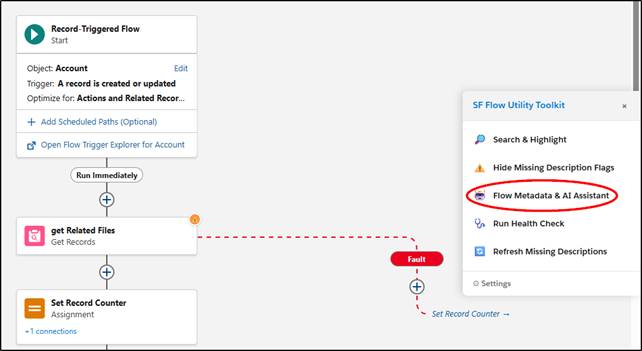
The extension allows you to extract Flow metadata in either:
- Raw format
- Clean format
The “Clean” version removes unnecessary metadata such as:
- Layout coordinates
- Internal IDs
- Visual positioning data
That reduction matters because it significantly lowers token usage when working with AI tools.
For most AI-assisted analysis, Clean mode is the correct choice.
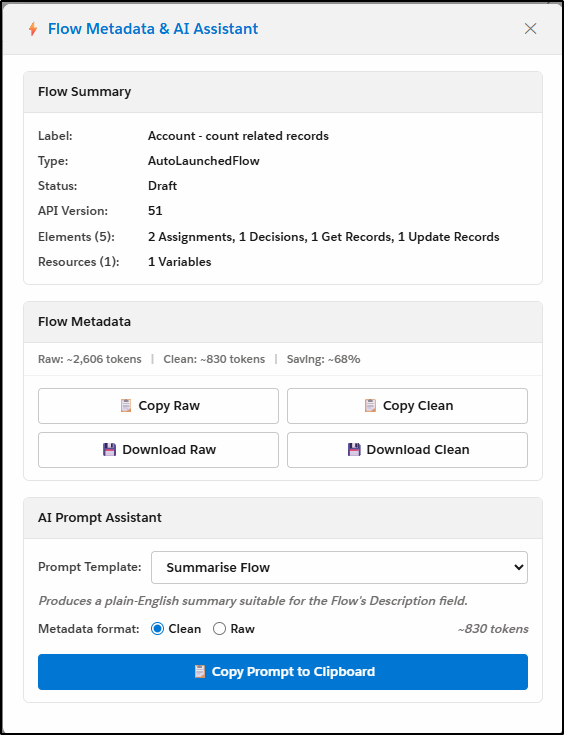
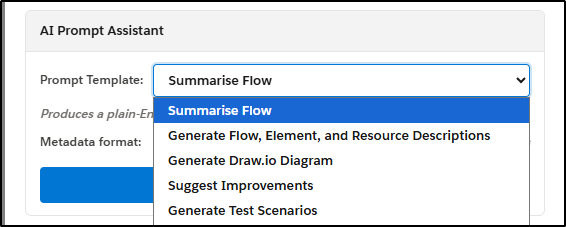
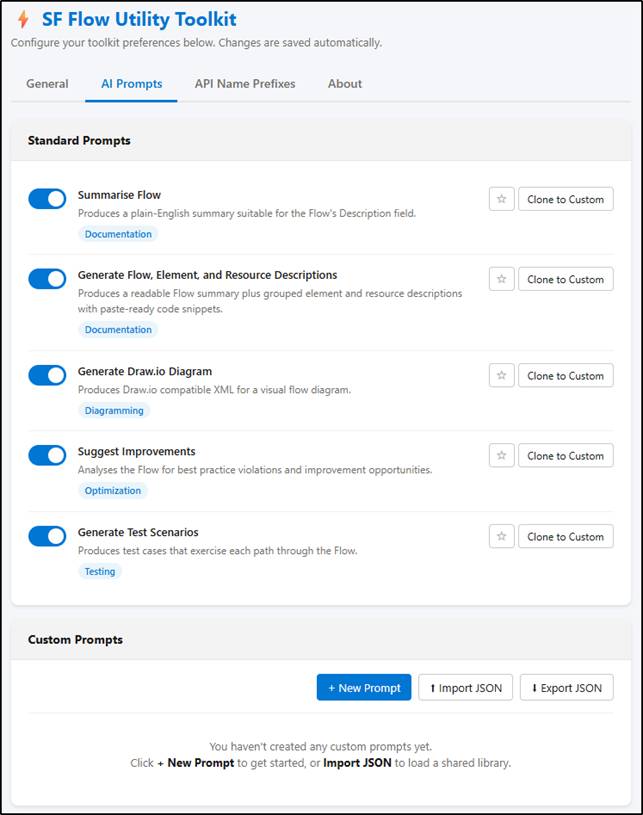
The toolkit also includes reusable AI prompt templates.
Instead of building prompts manually every time, you can generate structured prompts for tasks like:
- Summarising Flows
- Suggesting improvements
- Generating test scenarios
- Producing documentation
- Creating diagrams
This saves a surprising amount of time.
Summarise Flow
The “Summarise Flow” prompt template works particularly well.
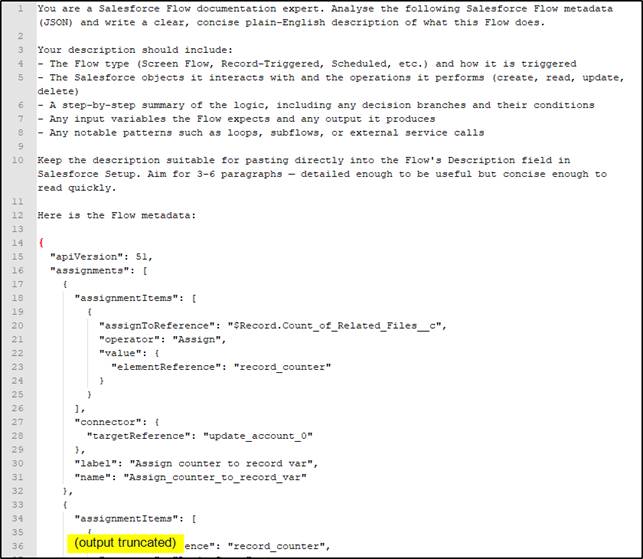
The extension packages:
- The prompt
- The cleaned metadata
- The Flow structure
…into a single AI-ready payload.
Paste it into your preferred AI tool, and you get a well-structured Flow summary that can often be reused directly in the Flow Description field.
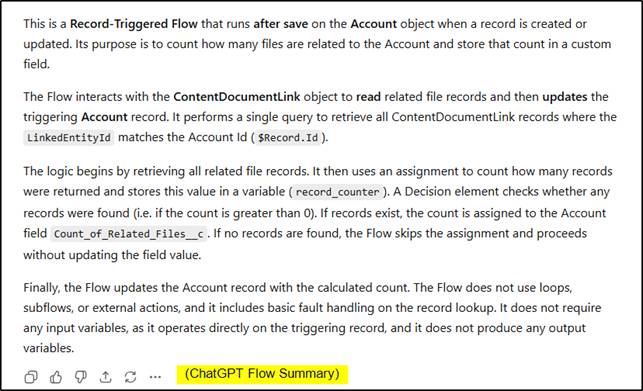
You can take this output and paste it into the Flow Description:
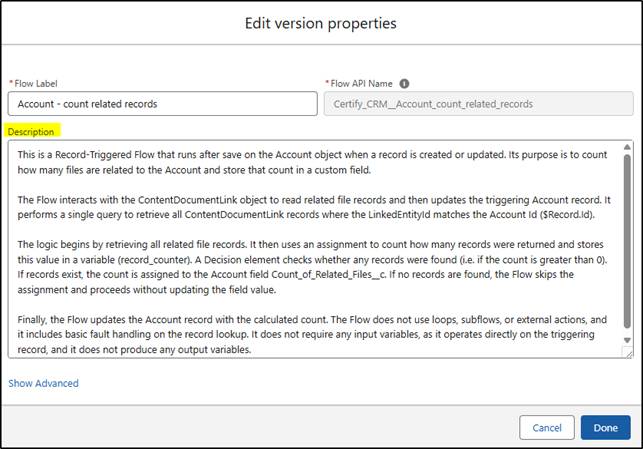
For admins documenting legacy Flows, this feature alone could save hours.
Generate Test Scenarios
Another practical feature is automated test scenario generation.
The toolkit can generate prompts that help AI tools produce:
- UAT scenarios
- Positive test cases
- Negative test cases
- Edge-case testing ideas
This is especially useful for teams that struggle with structured testing processes.
It also helps bridge the gap between technical admins and business testers.
Generate Draw.io Diagrams
One of the more creative capabilities is Draw.io diagram generation.
The extension can generate prompts that ask AI tools to create Draw.io compatible XML representing your Flow structure.
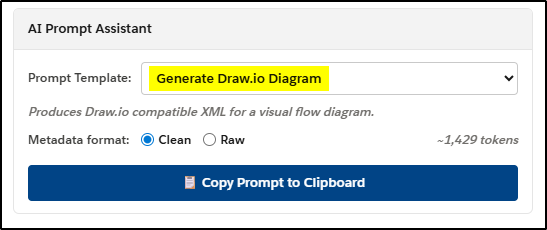
The process is:
- Generate the prompt
- Paste into an AI tool
- Copy the generated XML
- Save as an
.xmlfile - Open in Draw.io
The result is a visual diagram of your Flow.
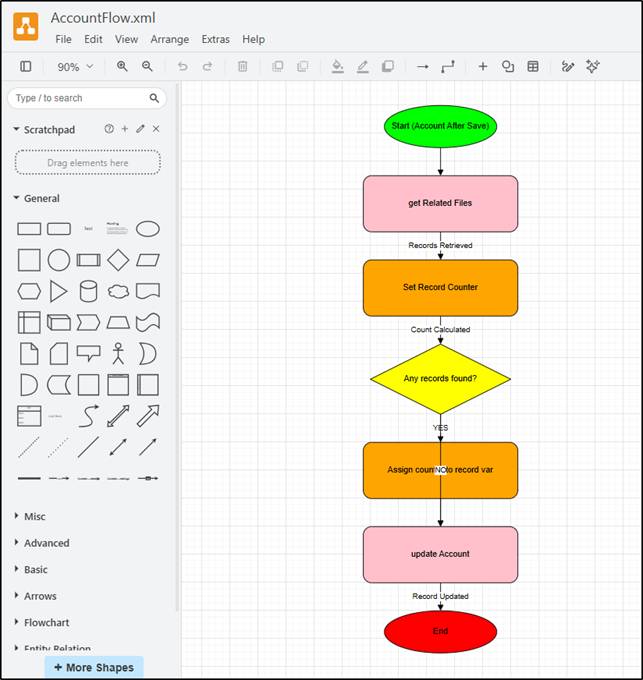
This will not replace formal architecture documentation, but it is very useful for:
- Workshops
- Technical discussions
- Solution design sessions
- Stakeholder overviews
Custom AI Prompt Templates
This is where the toolkit becomes much more powerful.
You are not restricted to the included prompts.
You can build your own reusable AI templates tailored to your organisation’s standards or review processes.
For example:
- Internal governance reviews
- Security assessments
- Naming convention checks
- Documentation standards
- Performance analysis
- Flow migration planning
That flexibility turns the extension from a utility into a framework.
Mark explains the process here:
Creating Custom AI Prompts for SF Flow Utility Toolkit
Flow Version Manager
Finally, an easier way to clean up old Flow versions.
The extension enhances the standard Salesforce version management page by allowing you to bulk-select old Flow versions for deletion.
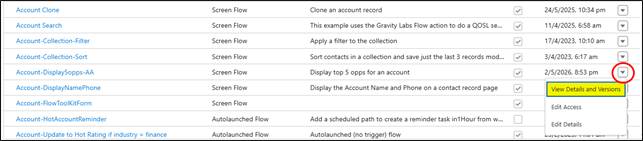
Anyone managing mature orgs knows how quickly unused Flow versions accumulate.
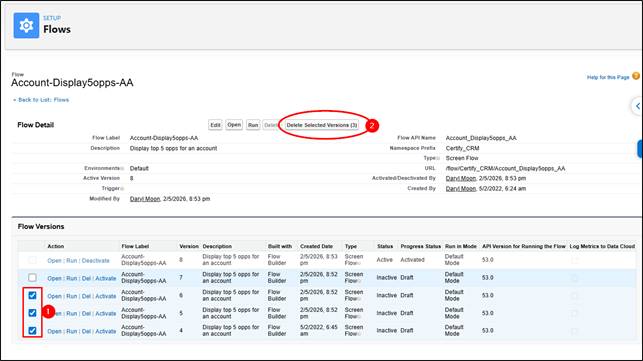
This feature alone will make many admins happy.
Canvas Search
The Search & Highlight feature allows you to search within a Flow canvas and automatically locate matching elements.
This sounds basic, but it solves a real usability issue in large Flows.
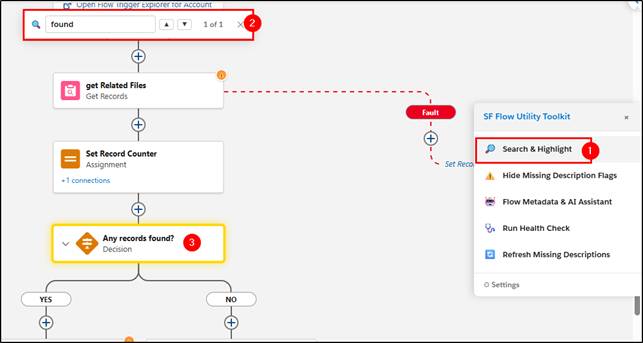
When dealing with enterprise Flows containing dozens or hundreds of elements, quickly locating logic becomes important.
Flow List Search
Another simple but highly practical enhancement.
The extension adds proper search capability to the Setup → Flows list view.
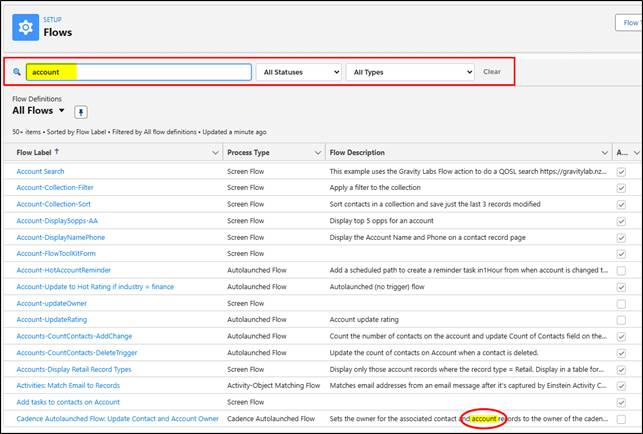
Even better, it searches Flow Descriptions as well.
Surprisingly, Salesforce has not added this natively already.
Settings & Configuration
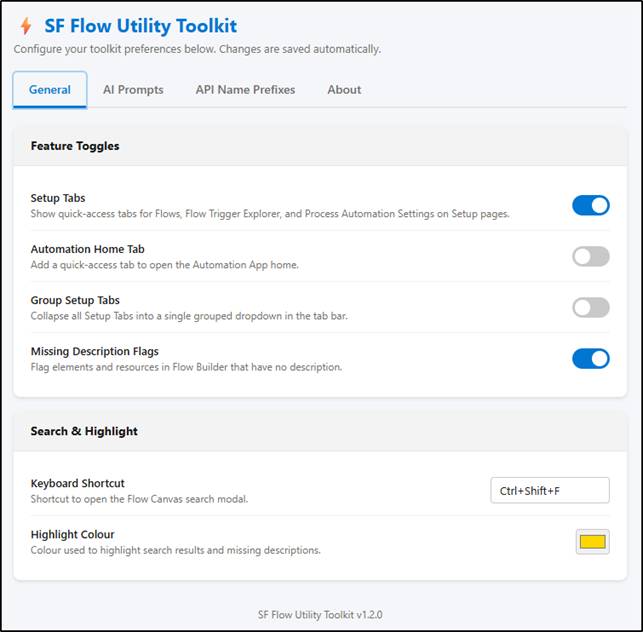
The extension includes a well-organised settings area covering:
- General behaviour
- AI prompts
- Naming conventions
- Prefix management
- Feature toggles
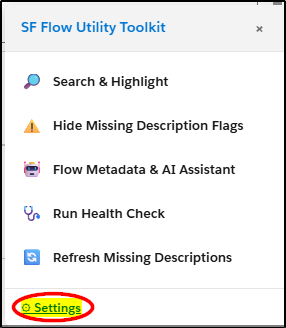
There are also links for:
- Documentation
- Feature requests
- Bug reports
- Change logs
- Privacy policies
First Page (General settings):
AI Prompts are configured here:
API Name Prefixes were covered earlier.
The About menu provides useful links to the webstores, feature requests and bug reports, change log, and privacy policies.
Overall Thoughts
This is one of the more practical Salesforce admin utilities released recently.
The standout feature is not just the AI integration itself. It is the way the toolkit prepares metadata properly for AI consumption.
That matters.
Most admins are still manually copying screenshots, Flow descriptions, or raw metadata into AI tools. This extension streamlines the process and makes the outputs significantly more useful.
The toolkit also reinforces good admin habits:
- Better documentation
- Better naming standards
- Better Flow governance
- Easier technical reviews
- Improved maintainability
For newer admins, it acts almost like a Flow mentor.
For experienced admins, it removes a lot of repetitive work.
The extension already feels valuable in its current form, and it will likely become even more useful as the AI capabilities mature further.
Useful Links
Chrome Extension
SF Flow Utility Toolkit on Chrome Web Store
Documentation
SF Flow Utility Toolkit Documentation
Story Behind the Extension
The Story Behind the SF Flow Utility Toolkit