
Salesforce Flow in your inbox
[updated 11 Sept, 2026 to include 3 extra videos]
Salesforce users spend most of their time in email responding to prospects and customer requests. When we ask them to leave that environment and log in to Salesforce, we naturally get resistance. “You are taking me away from selling” is a common complaint from Salespeople.
What if we could leave them in their familiar email environment (Gmail or Outlook) and still get Salesforce records created and updated?
FlowRunner is the glue that bridges this gap.
Run Flows In Email??
Installed into either Gmail or Outlook as a sidebar, FlowRunner intelligently looks up the email addresses in the email to find any existing records. It then displays a list of customer-defined and approved Screen Flows that the user can run. By using many of the values from the incoming email, the need for cutting and pasting is eliminated.
It’s not a sync tool!
Don’t confuse this with a sync tool to copy your emails and tasks across to Salesforce. You can continue to use Einstein Activity Capture or Cirrus Insight to do that, and they can happily co-exist with FlowRunner. FlowRunner’s purpose is to allow you to run your own business logic right inside your email without context switching between email and Salesforce.
Demo Flow Example
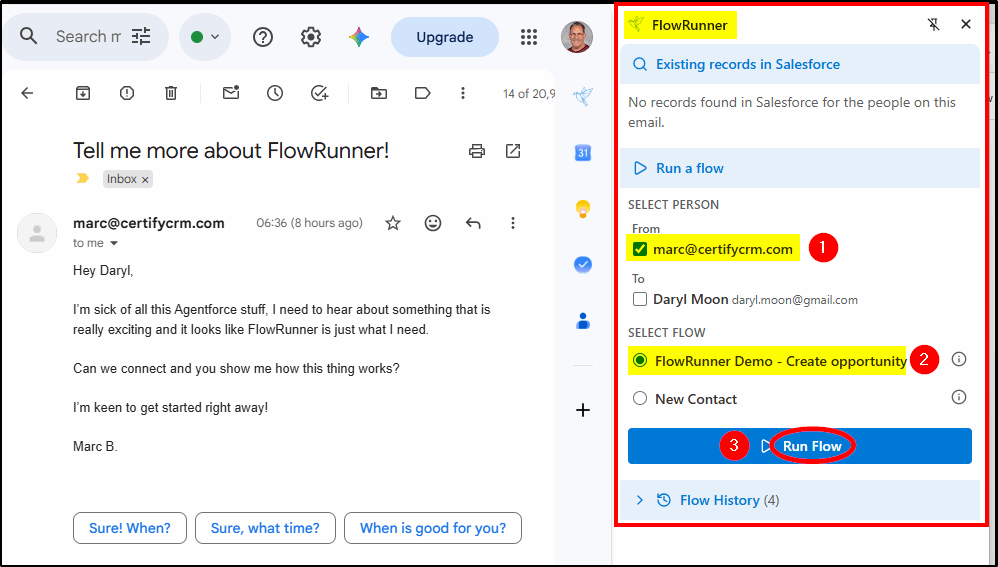
Here is an email from a new prospect:
FlowRunner did not find any matching Salesforce records for this email address, so the user simply selects the person (1) and the flow they want to run (2), then they click Run Flow (3).
This demo video shows how it works:
Behind the Scenes
Take a look behind the scenes – how to configure Flow Runner and enable your screen flows. Choose which flows to run and which users are permitted to run them. See how easy it is to configure and review the installation and configuration documentation.
See what has Changed
Now we go back to Gmail to see what difference the changes we made in the last video have had.
Custom Flows
The flows available to the user are written and approved by your own Salesforce team. Anything you can create in a screen flow can be run in the side panel (considering the screen space available).
Customize the Record Lookup Flow
The flow that runs at the start to discover existing matching records can be customized. You may want it to search for existing Leads, Cases, or a custom object. This video explains how to customize it:
Works with Outlook and Gmail
The Outlook add-in or Gmail Chrome extension authenticates the user via Microsoft or Google Single Sign On. It intelligently reads the email context – sender, recipients, subject, body, thread, message – and renders the FlowRunner side panel. The installation can be managed via Microsoft 365 Admin Center or Google Workspace.
Supports your Business Rules
Screen Flows execute under the user’s authenticated Salesforce session, against your data model, with your Permission Sets, validation rules, Apex, and triggers all firing as they would anywhere else in Salesforce.
Can I use my Existing Screen Flows?
Yes, add some input variables to receive the email context – an easy five-minute job per flow.
Does it work with my email?
Whether you use the free Gmail on the web, Google Workspace, New Outlook or Web on macOS or Windows, Outlook.com or OWA, FlowRunner will work in your inbox.
Can I test it in a Developer Org?
A simple, risk-free way to get started is to install the managed package in your developer org, then choose either the Outlook Add-in or the Gmail Chrome Extension. The Install Guide will step you through the process.
If you want to give it a try, you don’t even need a credit card;
just go here https://flow-runner.com/